01 · Overview
What Music Generation Can Do
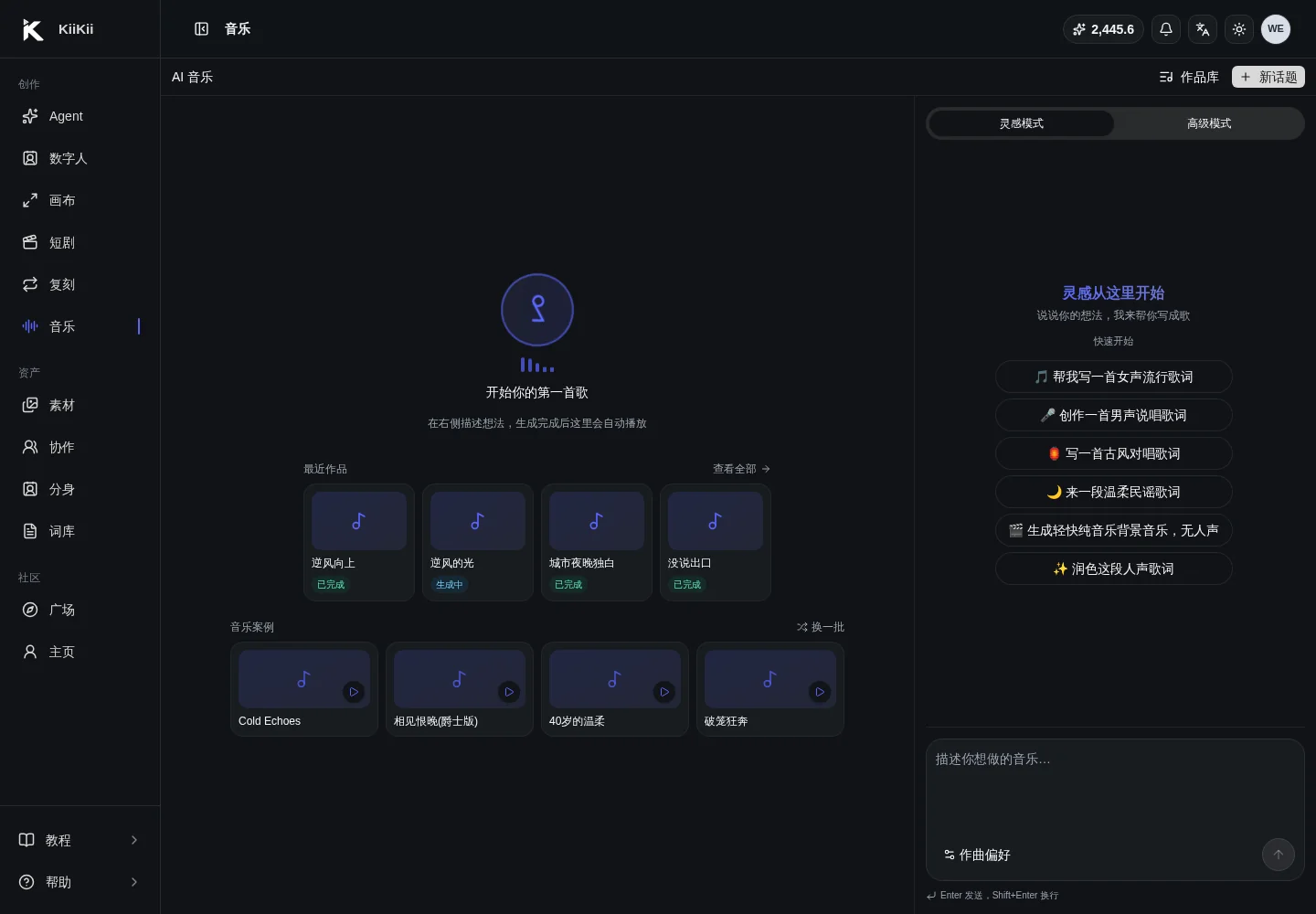
AI music puts lyric writing, style definition, vocal generation, post-production tools, and MV creation into one pipeline. You can generate a single song, or take the finished track further: separate stems, convert to MIDI, re-sing it with new lyrics, and finally bring it into a digital human to produce an MV.
Quick Answer
- Two creation paths: Inspire Mode (灵感模式) writes a song through conversation; Advanced Mode (高级模式) takes a title, style, lyrics, and ABC notation directly.
- Four post-production tools: Lyric Cover (改词翻唱), Voice Cover (克隆音色翻唱), Stem Separation (分离音轨), and MIDI Conversion (转 MIDI).
- ABC notation is a plain-text melody notation; you can skip it entirely if you do not read music.
- A finished track can be sent to the digital human Music MV (音乐 MV) mode in one click, with duration following the song.
- We recommend running one 1–2 minute song through Inspire Mode first, then trying Advanced Mode and the post-production tools.
The Full Pipeline
Write lyrics and set the style
Talk it through in Inspire Mode, or fill in title, style, lyrics, and ABC notation directly in Advanced Mode.
Generate and preview
Play the finished track in your library; switch versions, rename it, or generate another version to compare.
Post-production tools
Apply lyric cover, voice cover, stem separation, or MIDI conversion as needed; no song requires all of them.
Create the MV
Click Generate MV Video to bring the song into the digital human tool, then choose an avatar and visual style to generate the accompanying MV.
Download and publish
Download the audio or video, and check lyrics, assets, and commercial licensing against your platform's requirements.
Whether you get a full song or an instrumental depends on the creation type. Instrumental BGM (纯音乐 BGM) contains no vocals or lyrics and suits voice-over, retail, and video backgrounds; only the song type produces sung vocals.
02 · Inspire
Inspire Mode: Turn Ideas into Songs Through Conversation
Best when you have only a vague idea and are unsure about lyrics or style. Describe the scenario, mood, and use case; the AI asks for key details and returns an editable creation card.
How to Use It
- Start with one sentence about the use case: a short-video theme song, a brand song, in-store background music, or a score for an emotional voice-over.
- If needed, choose genre, language, vocal, mood, and duration under Composition Preferences (作曲偏好); up to three genres.
- The AI asks about duration, theme, mood, and other key details, then generates a creation card after you answer.
- The title, music style, and lyrics on the creation card can be edited directly; click Generate Now (立即生成) when you are done.
- The finished track goes to your library, where you can preview it, switch versions, or continue with post-production tools.
What It Delivers
It is built for a usable first version: complete melody, lyrics that fit the theme, and the right stylistic direction. Do not expect release-grade mixing on the first pass; refine later with regeneration, lyric cover, or MIDI conversion.
Instrumental BGM under Quick Start (快速开始) produces a backing track without vocals. If you plan a digital human voice-over or store-visit video, BGM is often more practical than a full song.
03 · Advanced
Advanced Mode: Precise Control over Title, Style, and Lyrics
When you know what you want, Advanced Mode is more direct than conversation: fill in title, music style, lyrics, optional ABC notation, and duration in one pass, then generate.
Key Fields
- Creation type: Song (with sung lyrics) or Instrumental BGM (no vocals).
- Title: required; used as the work name and for later search.
- Music style: a Chinese description is accepted and translated into English before generation; state genre, instruments, tempo, mood, and vocal type.
- Lyrics: mark sections with [Intro] [Verse] [Chorus] [Bridge] [Outro] so the model can follow the structure.
- ABC notation: optional. Fill it in when you have a definite main melody; otherwise leave it empty.
- Duration: for songs it is estimated from lyric length, up to about 5 minutes; for BGM you can pick the seconds directly.
How to Describe the Style
Do not write only nice or sad. Write genre + vocal + main instruments + tempo/BPM + emotional arc. For example: warm Mandarin pop female vocal, piano and strings underneath, 92 BPM, restrained verses building into layered choruses.
Advanced Mode suits creators who have already decided. If you are still unsure, use Inspire Mode to talk out a creation card first, then edit that card; it is faster.
04 · ABC Notation
ABC Notation Basics: Pin a Melody in Text
ABC notation is neither programming nor a staff-notation exam. It is a plain-text format that records melody with letters and symbols; its main advantage is that it can be copied, pasted, and read by AI as a melodic skeleton for your song.
Start with Six Header Fields
| Field | Meaning | Example |
|---|---|---|
| X: | Sequence number, one per tune | X:1 |
| T: | Title | T:Against the Wind |
| M: | Time signature, beats per bar | M:4/4 |
| L: | Default note value | L:1/8 |
| Q: | Tempo / BPM | Q:1/4=92 |
| K: | Key signature | K:Dm |
Writing the Body
- A–G are pitches; a comma marks the lower octave and an apostrophe (') marks the higher octave.
- Numbers set note length: A2 is twice the value, A/2 is half.
- z is a rest, | is a bar line, [CEG] is a chord.
- Lyrics can go on w: lines, aligned to the note order.
Minimal ABC Example
X:1
T:My First Melody
M:4/4
L:1/8
Q:1/4=92
K:C
C D E F | G2 G2 A2 A2 | G4 z4 |
Not knowing ABC does not limit you. Fill it in under Advanced Mode or ABC Edit only when you already have a definite melody to pin down, or when you have ABC text from another tool.
05 · Cover
Lyric Cover: Keep the Melody, Change the Message
Upload a reference track; the AI extracts its melodic structure and re-sings it with your new lyrics and style. It solves the case where the melody stays the same and the content becomes yours.
Steps
- Upload the reference track: mp3 / wav / flac / m4a, up to 20MB.
- Enter new lyrics; the previous version's lyrics are pre-filled and can be edited directly.
- Enter an English style description of at least 10 characters, covering the new version's genre, instruments, and vocal.
- Submit to generate; the new version sits alongside the old one so you can switch and compare.
When to Use It
Localizing a brand theme song, adapting a track for an event, story-driven remixes, multilingual versions of the same melody, or reshaping a song to fit your account's persona.
You need the appropriate rights to the reference track and lyrics. Do not cover copyrighted works and publish them commercially without permission.
06 · Voice Cover
Voice Cover: Melody Plus a Specified Timbre
One step beyond lyric cover, with a dry vocal reference: the reference track supplies the melody, the dry vocal reference decides the timbre, and the song is re-sung with your new lyrics.
Key Parameters
- Reference track: used to extract melodic structure; mp3 / wav / flac / m4a, ≤20MB.
- Dry vocal reference: decides the timbre; an a cappella or pure vocal take is best, and overly long files are trimmed from the start.
- Timbre strength: higher values stay closer to the reference timbre, default 0.8; too high can cost naturalness.
- New lyrics and style: determine what this version sings and in which genre.
What It Delivers
Singing someone else's melody in your own cloned timbre, building a brand-exclusive vocal version, or presenting the same song in different timbres. If you want to keep the original singer's timbre, skip this tool and use Lyric Cover.
Use only your own voice samples or samples you are explicitly authorized to use. Do not clone public figures, other people's voices, or film characters without permission.
07 · Stems
Stem Separation: Split a Finished Track into Four Stems
Stem separation splits the current finished audio into four independent tracks: vocals, instrumental, drums, and bass. Each can be previewed and downloaded separately.
| Stem | Content | Typical Use |
|---|---|---|
| Vocals | Dry a cappella vocal | Timbre reference for voice cover, re-editing, a cappella versions |
| Instrumental | Full backing track with vocals removed | Karaoke, cover backing, voice-over background |
| Drums | Percussion rhythm track | Beat sync, re-arranging, rhythm sampling |
| Bass | Bass and low-frequency track | Mixing, re-orchestration, low-end design |
When to Use It
When you need vocals as a timbre reference, want to keep the backing and swap the vocal, want to sample drums or bass into another song, or need to rebalance levels in an editing tool.
Separation quality depends on the source mix; vocals and instrumental can never be split with zero residue. Dialogue, live recordings, and heavily reverberant material separate less cleanly.
08 · MIDI
MIDI Conversion: Turn a Sung Melody into an Editable Score
MIDI conversion detects the vocal melody in a song and produces a .mid file you can open in arranging software. Choosing Chinese or English vocals affects lyric recognition and melody extraction accuracy.
What You Can Do With It
- Edit the melody, change timbres, or adjust the rhythm in a DAW or arranging app.
- Make an instrumental, piano, or string version, or re-arrange the track.
- Export the score for session players or for teaching.
- Move the main melody onto another backing track and keep writing.
It extracts the main melody, not full multi-track stems; drums, bass, and harmonies do not become separate MIDI tracks. For stems, run Stem Separation first.
Confirm the song's vocal language before converting; choosing English for a Chinese song reduces accuracy. Conversion usually takes a few minutes, after which you can download the .mid file and a JSON file of vocal metadata.
09 · To MV
Bring It into a Digital Human to Generate an MV
Once the music is generated, there is no need to upload the song again. On the song detail page, click Generate MV Video and the system carries the song URL and title straight into the digital human Music MV mode.
Path
- On the song detail page, click Generate MV Video to open the digital human creation page with Music MV mode selected automatically.
- The song is carried over automatically; an optional second avatar can be used for duets, choruses, or a second character.
- Add MV direction, for example: an emotional performance on a rainy street at night, contrasting warm and cool light, with the camera pushing in on the chorus.
- Choose aspect ratio and resolution; MV duration follows the song, so no target length is needed.
- Preview online and download when done, or return to the storyboard to retry shot by shot.
What It Delivers
Turn original songs, lyric covers, and voice cover versions directly into publishable vertical MVs; you can also test choruses with the music tools first and turn the best version into an MV, which lowers video generation cost.
10 · Showcase
Showcase: Listen to Finished Tracks
The tracks below come from the same source as Music Examples (音乐案例) and were produced with AI music generation plus lyric rewriting, timbre cloning, or re-arrangement. Headphones help you judge vocal texture and arrangement layers.
Breaking the Cage
High-energy rockHard drums and a driving chorus, suited to beat-synced edits for sports and plot-twist short videos.
Empty Cup
Guofeng narrativeTraditional Chinese instruments with a storytelling vocal, suited to period, culture explainer, and brand story content.
Snowfall Says I Love You
Lyrical popSlow ballad with a clear vocal, suited to emotional voice-over, weddings, and holiday content.
Hangzhou Girl
Urban folkLight folk guitar, suited to city store visits, travel logs, and lifestyle vlogs.
What to Listen For
- Whether the vocal is clear, the diction natural, and the language matches the target.
- Whether the chorus is memorable and the first 15 seconds hold attention.
- Whether the arrangement is layered enough: only vocals and chords, or drums, bass, and atmosphere as well.
- Need a different voice? Run Voice Cover. Need the backing alone? Run Stem Separation.
The examples demonstrate timbre and arrangement only. Before commercial release, confirm the licensing scope for lyrics, melody, and voice samples.
11 · FAQ
FAQ
The questions that come up most often on a first run through the music tools.
How do I choose between Inspire Mode and Advanced Mode?
If it is your first time and you only have a vague idea, use Inspire Mode and talk through theme, genre, language, vocal, and mood. If you already know the title, style, and lyrics, or need to enter ABC notation and an exact duration, use Advanced Mode. Tracks from both modes go to your library, where you can continue with lyric cover, voice cover, or an MV.
Do I need to learn ABC notation if I don't read music?
No. Without ABC notation, write lyrics and style in Inspire Mode or Advanced Mode. ABC notation is for people who already have a definite melody they want to fix in place, or who get ABC text from an external tool.
What is ABC notation?
ABC notation records melody as plain text. X is the sequence number, T the title, M the time signature, L the default note value, Q the tempo, and K the key; A–G are pitches, z is a rest, and | is a bar line. It is easier than staff notation to copy, paste, and have an AI read.
What is the difference between Lyric Cover and Voice Cover?
Lyric Cover keeps the melodic structure of the reference track and re-sings it with new lyrics and style. Voice Cover also needs a dry vocal reference so the new performance moves closer to the specified timbre. The first changes the words; the second changes the words and the voice.
What is stem separation actually used for?
It splits a finished track into four stems: vocals, instrumental, drums, and bass. The vocal stem can serve as a vocal reference or for re-editing; the instrumental works as karaoke or cover backing; drums and bass serve re-arranging, mixing, or beat-synced short videos.
What can MIDI conversion do?
MIDI conversion extracts the main melody from the song's vocals and produces a .mid file that opens in arranging software. It suits changing the melody, swapping timbres, making an instrumental version, or re-arranging in a DAW; it is not a full multi-track split, so band parts are not separated into individual MIDI tracks.
How do I turn a generated song into an MV?
On the song detail page, click Generate MV Video. The system carries the song URL and title into the digital human Music MV mode. Choose the avatar, second avatar, and visual style, then generate. MV duration follows the song, so no target length is needed.
Can generated music be used commercially?
Make sure you hold the necessary rights to lyrics, melody, reference audio, voice samples, and avatar assets, and comply with platform rules and local law. Do not cover others' works, clone others' voices, or use copyrighted reference tracks without authorization.