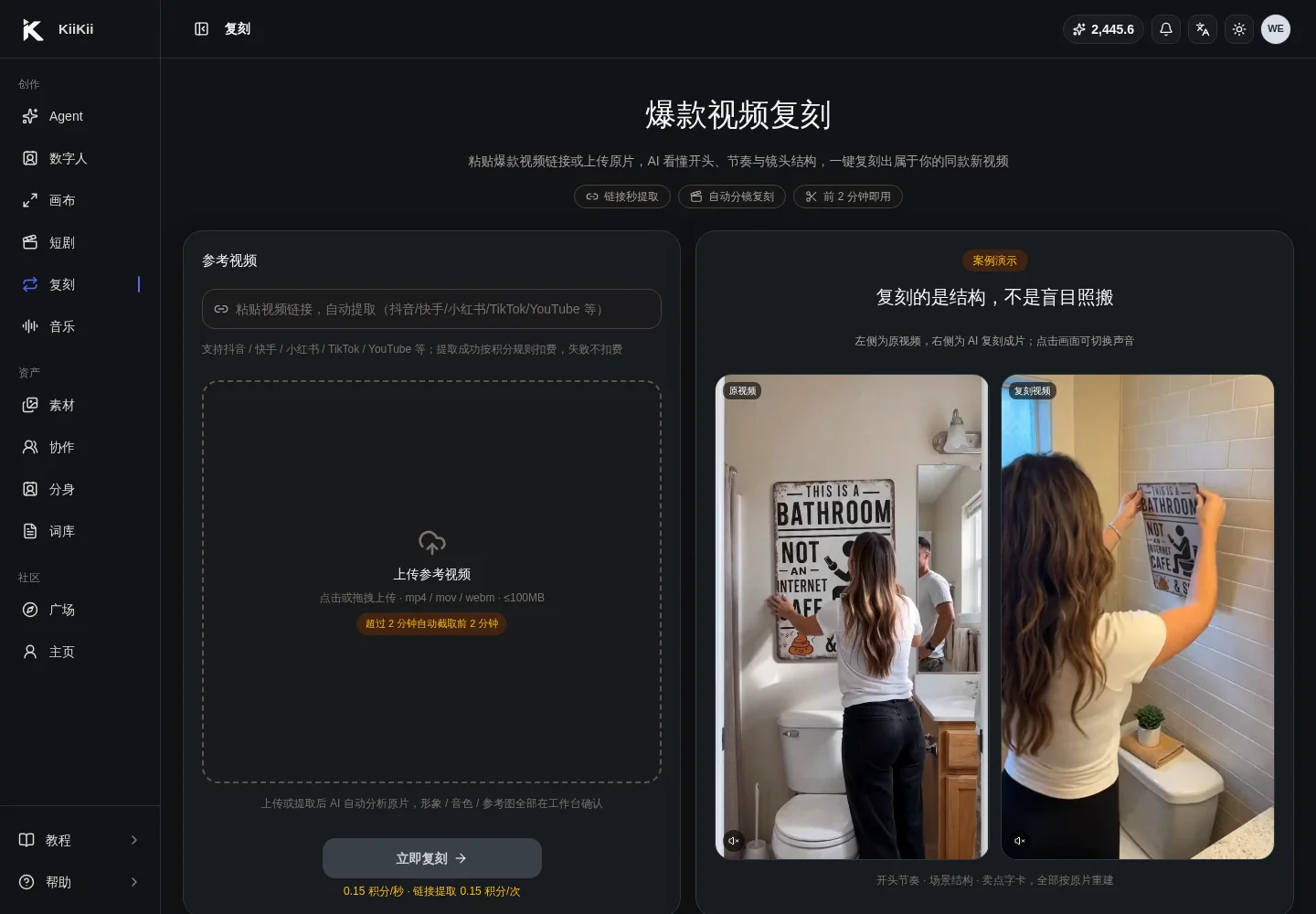
01 · Overview
Remix copies the structure, not the surface
Video Remix first reads the source video's opening, rhythm, shot structure, and elements, then lets you decide what to keep and what to replace. It is built for creating content in the same vein, not for putting a new face on an existing clip.
Quick answer
- Remix captures the opening hook, shot order, rhythm, scene structure, and selling-point text cards.
- You can replace the people, product, scenes, voiceover, and script.
- Existing digital-human avatars and cloned voices can be reused directly.
- Keep the first 3 seconds, the shot order, and the overall duration; don't change the structure.
- Source videos can be up to 2 minutes and 100MB; longer videos are trimmed to the first 2 minutes.
What remix breaks the video into
- Character: the presenter, model, or role in the source video, which can be replaced with a digital-human avatar.
- Product / object: the item being held, shown, or used; upload a replacement image or describe it in text.
- Scene / background: storefront, room, street, livestream set, and other environments.
- Structure: opening hook, shot order, rhythm, text-card placement, and closing call to action.
Remix is not one-click reposting. The source video provides structural reference only; the final footage is regenerated from the avatar, product, scene, and requirements you choose, so check that the element mapping matches your intent.
02 · Scenarios
Where remix fits best
Following the keep-the-structure, replace-the-elements approach, remix suits the following kinds of content.
| Scenario | What to keep | What to replace | Best for |
|---|---|---|---|
| E-commerce product ads | Opening hook, shot order, selling-point text-card rhythm | People, product, scene, voiceover | Produce same-structure ad assets quickly and test different products |
| Store visits | In-store walkthrough, environment reveal order, closing call to action | Store, signature products, people | Local group buys, foot traffic, one template across chain stores |
| Talking-head explainers | Information hierarchy, rhythm, subtitle placement | People, voice, script examples | Batch-produce explainers and course clips with the same structure |
| Story / comedy re-shoots | Conflict points, twists, shot rhythm | Characters, scenes, props | New takes on a proven idea with lower scripting cost |
| Product swaps | Handheld action, close-up timing, composition | Product and product information | Apply one shooting formula across different SKUs |
Remix works best with source videos that have a clear structure, strong rhythm, and stable shots. Videos with very fragmented shots, heavy fast camera movement, or complex live-action performance are harder to remix.
03 · Source
Upload or extract the source video
Upload mp4 / mov / webm directly, or paste a Douyin, Kuaishou, Xiaohongshu, TikTok, or YouTube link to extract it automatically.
Upload or paste a link
Uploads must be under 100MB. Credits are deducted per platform policy only when link extraction succeeds; failures are not charged.
Auto-trim to the first 2 minutes
Videos longer than 2 minutes are trimmed to the first 2 minutes for analysis and remix, avoiding wasted waiting.
AI audio-visual understanding
Detects shots, people, objects, scenes, dialogue, and rhythm, then produces a list of replaceable elements.
Open the workbench
Decide keep or replace for each element in the confirmation cards, then submit for generation.
The source video is a structural reference only. Make sure the source video, music, and footage you use do not infringe anyone's copyright or likeness rights, especially for paid commercial use.
04 · References
What reference images are for: deciding what AI replaces
After uploading reference images, you must tag a purpose for each one. The purpose tag drives the AI's replacement mapping; it is not just decoration.
| Purpose | Replacement target | Upload tips |
|---|---|---|
| Character (人物形象) | The on-camera subject in the source video | Front-facing, clear, and evenly lit; you can also pick a digital human from the avatar library |
| Product / Object (产品/物品) | The item being held or shown | Clean background, complete subject; add the name, selling points, and details you want highlighted |
| Scene / Background (场景/背景) | Environment, storefront, room, street | Match the target scene; avoid large differences in perspective and lighting |
Upload tips
- Up to 6 reference images, each tagged with a purpose.
- For products, provide front, side, or in-use shots so the AI can understand materials and structure.
- Choose either a character image or a digital-human avatar: to reuse an existing avatar, pick it in the character step; for a new person, upload a reference image.
- Scene images should avoid too much text, watermarks, or unrelated people, which can be misidentified.
05 · Reuse
Reuse existing digital-human avatars and voices
You don't need to rebuild an avatar and voice for every remix. You can use cloned avatars, designed avatars, and cloned voices from the digital-human asset center directly.
Choosing characters and voices
- Characters: cloned avatars and designed avatars; up to 3, which suits multi-character or duet/dialogue structures.
- Voices: My Cloned Voices; up to 3, so different characters can use different voices.
- No character selected: keep the source video's character structure, or let AI perform freely based on the source.
- No voice selected: keep the original audio, or let AI generate new dubbing.
When reuse makes sense
Reuse existing avatars and voices when an account needs a consistent persona, a brand needs a unified look, or the same character stars in a series of remixes. Consistency and recognizability improve, and you avoid regenerating an avatar each time.
Once a voice is selected, the dialogue is spoken in that voice, effectively replacing the original audio. If the source video has important ambient sound or multi-person dialogue, first confirm that replacing it won't affect the message.
06 · Workbench
Element confirmation workbench: decide keep or replace, one by one
Once AI understands the source video, it pauses at Elements to Confirm (待确认元素) and lists people, objects, and scenes one by one for you to keep or replace.
What to check when confirming
- Whether the person was identified correctly; to change the avatar, click Change Avatar (更换形象) and pick one from the library.
- Whether the product or object is the item you want to replace; after uploading a replacement image, fill in the product name, selling points, and details.
- Whether the scene should stay as is; to switch stores or rooms, upload the matching scene image.
- For elements you want to keep, click Keep as Is (保留原样) explicitly; don't leave it blank.
- You can add overall revision notes, such as pacing, mood, or dialogue style, before confirming generation.
After you confirm and start generation, the parameters and element mapping are locked. One extra minute of checking before confirmation saves more credits than redoing the work afterward.
07 · Change Matrix
What to change and what to leave alone
The core of remix is a stable structure with controllable elements. Change the wrong thing and you lose the source video's rhythm advantage; change nothing and it becomes reposting.
| Recommended to change | Why | Not recommended to change | Why |
|---|---|---|---|
| People, characters, voice | Switch to your account persona or brand character | The first 3-second hook | It drives completion rate and attention |
| Product, objects, selling points | Switch to what you are selling or showing | Shot order and rhythm | Remix copies structure, not footage |
| Scenes, storefronts, environments | Match your actual shooting location | Overall duration and segment proportions | Change the duration structure and the rhythm falls apart |
| Script, subtitles, voiceover | Switch to your own messaging and compliant wording | Key actions and composition | Actions and composition determine whether replacements look natural |
| Closing call to action | Change to follow, order, visit, or direct message | Subtitle timing | It affects viewing and information retention |
Recommendations by scenario
- E-commerce same-style: keep the hook, shot order, and selling-point text-card rhythm; change the people, product, scene, and pricing. Don't swap in a product so different in shape that it cannot be held naturally.
- Store visits: keep the in-store path and the environment reveal order; change the storefront, environment, and signature products. Don't change the path in ways that break the spatial logic.
- Talking-head explainers: keep the information hierarchy and rhythm; change the people, voice, and examples. Don't alter key facts or evidence.
- Story re-shoots: keep the conflict points, twists, and rhythm; change the characters, scenes, and props. Don't copy copyrighted dialogue, music, or brand marks.
Don't reuse the source video's likeness, brand logos, copyrighted music, or long passages of dialogue for commercial publishing. Structure can be referenced; you must clear the rights to the assets yourself.
08 · Delivery
Generation and review
After you confirm the elements, AI plans the shots, pre-deducts credits, generates segment by segment, and stitches the result automatically. When it's done, you can compare the source and the new video and download a clean or edited version.
Review segments
Each segment is generated independently; failed segments can be retried on their own, and everything is stitched automatically once all succeed.
Compare with the source
Check the opening hook, shot order, whether the people and product swaps look natural, and whether subtitles are blocked.
Download a version
The clean version (纯净版) has no editing packaging; the edited version (剪辑版) includes text cards and packaging. Choose by publishing platform.
Publishing copy
Generate three sets of copy (suspense, informative, emotional) and verify platform rules and factual details before publishing.
09 · Showcase
Results: source video vs. remixed output
The same source video, regenerated with a new presenter, product, and scene. Focus on whether the opening hook, shot order, and rhythm are preserved.
Source video
The original video used for structure analysis: the first 3-second hook, shot order, scene, and voiceover rhythm.
Remixed output
Generated by keeping the source structure and replacing the avatar, voice, and visual elements.
When comparing, first check whether the structure and rhythm match, then whether the people, product, and scene swaps look natural. A drifting structure means too much was changed; stiff replacements mean the reference images and descriptions were not specific enough.
10 · FAQ
FAQ
The questions people run into most on their first remix.
Does remix simply put a new face on the original video?
No. Remix understands the source video's opening hook, shot order, rhythm, scene structure, and selling-point text cards, then re-performs them with the avatar, product, and scene you choose. It copies the structure, not the original footage.
Can I reuse existing digital-human avatars and cloned voices?
Yes. In the character step, pick existing cloned or designed avatars from the My library, up to 3 per project. In the voice step, choose from My Cloned Voices, keep the original audio, or let AI generate freely. Once a voice is selected, the dialogue is spoken in that voice.
Can I remix a video that has no people in it?
Yes. If the source has no people, selecting Character makes the digital human re-perform in that role; if you only want to replace the product and scene, you can keep the source's no-person structure.
How long can the source video be?
Uploaded or link-extracted videos can be up to 2 minutes and 100MB; anything longer is trimmed automatically to the first 2 minutes for analysis and remix. Start by testing with a proven 15–60 second structure.
What should I change, and what should I leave alone?
Change the people, product, scene, voice, script, and selling points; don't change the first 3-second hook, shot order, overall duration, key actions, or composition. Change the structure and remix's rhythm advantage disappears.
Are credits refunded if a remix fails?
Submitting pre-deducts credits per segment, and failed segments are refunded automatically; you can also retry a single segment. You can stop a job mid-generation, and unfinished segments are refunded per the rules.
Can the remixed video be used commercially?
Make sure you hold the appropriate rights to the source structure, reference images, avatars, voices, music, and script, and comply with platform rules and the law. Do not directly copy anyone else's brand marks, likeness, or copyrighted footage or music.